::Trend Micro Threat Resource Center::
Showing posts with label Mac OS. Show all posts
03 February 2015
Hackers target third new zero-day for Adobe Flash
Security researchers have advised users of Adobe's Flash Player to disable the software temporarily, as yet another remotely exploitable vulnerability is being actively attacked by would-be hackers.
The bug has the potential to allow attackers to take full control of users' computers without their interaction.
Recently-released Flash Player versions 16.0.0.296 for Microsoft Windows and Apple OS X are vulnerable to the CVE-2015-0313 vulnerability, which Adobe rates as critical. Versions 13.0.0.264 and earlier are also vulnerable, along with Flash Player 11.2.202.440 and earlier for Linux.
Security vendor Trend Micro is credited with discovering the new zero-day vulnerability alongside two Microsoft researchers.
The company said CVE-2015-0313 is being actively exploited in drive-by attacks delivered via malicious advertisements, believed to have been executed through the Angler Exploit Kit.
"Malvertisements" on popular websites redirect visitors to a series of other sites, finally landing at a Russian-registered domain that attempts to deliver the payload that executes the exploit.
Trend Micro said it has already counted over 3000 hits related to CVE-2015-0313, suggesting the vulnerability is being widely used by attackers.
Neither the security vendor nor Adobe have yet published a full analysis of the new zero-day, which is the third to strike the popular Flash Player software in a month.
15 January 2015
World’s first (known) bootkit for OS X can permanently backdoor Macs
Securing Macs against stealthy malware infections could get more complicated thanks to a new proof-of-concept exploit that allows attackers with brief physical access to covertly replace the firmware of most machines built since 2011.
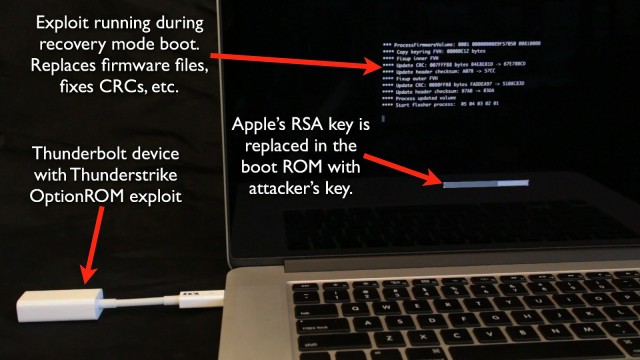
The malware has been dubbed Thunderstrike, because it spreads through maliciously modified peripheral devices that connect to a Mac's Thunderbolt interface. When plugged into a Mac that's in the process of booting up, the device injects what's known as an Option ROM into the extensible firmware interface (EFI), the firmware responsible for starting a Mac's system management mode and enabling other low-level functions before loading the OS. The Option ROM replaces the RSA encryption key Macs use to ensure only authorized firmware is installed. From there, the Thunderbolt device can install malicious firmware that can't easily be removed by anyone who doesn't have the new key.
Enter evil maid
While the hack requires an attacker to have brief physical access to a targeted machine, that prerequisite isn't prohibitively steep in many situations. For example, so-called "evil maid" scenarios—in which a rogue hotel housekeeper tampers with a computer—or an agent at an international border crossing both routinely have access to computers, often while unsupervised. Documents leaked by former National Security Agency subcontractor Edward Snowden also exposed how agents intercept hardware being shipped to organizations targeted for surveillance and covertly install modified firmware onto them before they’re delivered.
All any of these attackers would need to do to carry out a Thunderstrike-style attack is to reboot a Mac with a previously weaponized Thunderbolt device attached. If the machine is turned on but locked, the attacker need only press the power button for a few seconds to hard-reboot the machine. Firmware passwords, disk encryption passwords, and user passwords won't thwart the attack since the Option ROMs are loaded before any of those protections are checked.
Thunderstrike made its debut in late December, at the Chaos Communication Congress. The vulnerability was discovered by Trammell Hudson, an employee of a high-tech hedge fund in New York City called Two Sigma Investments, while trying to secure the firm's MacBooks. A self-described reverse engineering hobbyist, Hudson was previously known for creating Magic Lantern, an open source programming environment for Canon digital SLR cameras.
Thunderstrike builds on a similar attack as demonstrated at the 2012 Blackhat conference that bypasses OS X FileVault protections to install a rootkit. Like Thunderstrike, the 2012 exploit used Thunderbolt ports to inject the malicious payload into the boot process, but the earlier attack wasn't able to modify the boot ROM itself. To work around that limitation, the researcher—who works under the hacking moniker snare—wrote the bootkit to the EFI system partition.
Eureka
One of the breakthroughs of Thunderstrike is its ability to get the boot ROM firmware volumes validated. Hudson figured out how to do this after discovering an undocumented CRC32 cyclic redundancy check routine carried out during the normal validation process. A second breakthrough involved the discovery that Option ROMs are loaded during a recovery mode boot. That allowed Hudson to figure out how to replace Apple's existing EFI code.
Thunderstrike was just one of at least two EFI-based attacks that were demonstrated at December's Chaos Communication Congress. A separate talk delved into the Unified Extensible Firmware Interface, a similar mechanism that's used to boot some Windows and Linux machines. Hudson said an attack technique known as Dark Jedi that was outlined during the talk could possibly be adapted to make his exploit work remotely, so the attacker wouldn't require physical access. Earlier this week, the US CERT issued three advisories warning of vulnerabilities in widely used UEFI chips. A researcher from security firm Bromium also has this brief writeup on the UEFI talk.
Hudson said Apple is in the process of partially patching the vulnerabilities that make Thunderstrike possible. The remedy involves not allowing Option ROMs to load during firmware updates, a measure that Hudson said is effective against his current proof of concept. Apple already has begun rolling out the upgrade to Mac Mini's and iMac Retina 5ks and plans to make it more widely available soon.
"However... it is not a complete fix," he warned in a blog post detailing Thunderstrike. "Option ROMs are still loaded on normal boots, allowing snare's 2012 attack to continue working. Older Macs are subject to downgrade attacks by 'updating' to a vulnerable firmware version."
Until there's a complete fix from Apple, there aren't a lot of viable options for preventing Thunderstrike-type attacks. Pouring a liberal amount of epoxy glue in a Thunderbolt port will certainly make the exploit harder, since it would force an attacker to take apart the casing to access the underlying flash ROM chip, but it would come at the cost of disabling key functionality. The other obvious solution is for people to keep their machines on their person at all times, but that isn't always practical, either. Hotel safes and locked and sealed storage boxes are also only partially effective, since both measures are vulnerable to cracking and picking.
17 November 2014
Suspected WireLurker malware creators arrested in China
Beijing police have arrested three people suspected of developing the “WireLurker” malware that may have infected as many as hundreds of thousands of Apple users.
Local authorities arrested the three suspects on a tip from Chinese security company Qihoo 360 Technology, the Beijing police’s Internet security team said Friday.
The three suspects, surnamed Chen, Li and Wang, were detained Thursday and charged with creating and spreading the malware, the police said in a post on its official Sina Weibo account. The police did not publish the full names of the suspects. It's ironic that China, believed to be one of the largest state sponsors of organized cyberattacks against the Western world, moved so quickly to arrest the creators of WireLurker
The malware appeared to victimize Chinese users only, and didn't have a widespread presence outside of the country. The suspects had conspired to create WireLurker as a way to gain illegal profits, and used a Chinese third-party application store called Maiyadi to spread the malware, the police added. The Maiyadi site has also been shut down.
WireLurker made headlines last week, after researchers at Palo Alto Networks discovered the malware and found that it could collect call logs, phone book contacts, and other personal information from Apple mobile devices.
Qihoo 360 Technology traced the malware back to Maiyadi, a Chinese site devoted to Apple news that also offers downloads of iOS apps and Mac software.
The malware spreads when users download an infected Mac application to their desktops or laptops. It then will go on and try to infect iOS devices once they’ve connected to the Mac via a USB cable.
About 467 Mac desktop applications infected with the malware were discovered at Maiyadi. WireLurker had yet to progress beyond collecting users’ data, Palo Alto Networks said last week.
Apple was quick to act, and said it had blocked the infected apps from launching on users’ systems. Apple did not specify how it stopped the apps from launching.
10 November 2014
How To Find And Remove WireLurker Malware From iPhone, iPad
The WireLurker Malware is the malware which is badly affecting iPhone and iPad. This malware has hit many iOS and OS X devices in China already.Therefore, most of the users across the globe are little worried about the security of their device.
Known to exist as a threat in China for now, but if you think you’re infected by WireLurker, then here’s how you can remove it before it does any damage.
If you’re jailbroken and believe that you’re affected by WireLurker, then follow the steps which are outlined below. But be warned, the steps might be a little complicated for some users, and if you feel that you don’t want to go through the tedious process, then simply do a clean restore of your iPhone, iPad or iPod touch using iTunes on the latest currently available public iOS release.
For Jailbroken Users
Step 1: Make sure you have iFile installed from Cydia, or the capability to SSH into your iOS device to access system directories.
Step 2: Navigate to /Library > /MobileSubstrate > /DynamicLibraries.
Step 3: Here, look for a file named sfbase.dylib, and if found, you know your device is infected.
However, if no such file exists, breathe a sigh of relief.
Normally one would perceive deleting this file as a removal of the threat that WireLurker is, but it is recommended that you do a complete restore of your iOS device from iTunes.
For Non-Jailbroken Users
Although there’s no way you can be infected by WireLurker at this point, considering Apple has placed in appropriate security measures, but, there’s a possibility that you conceived the malware a while back before the Cupertino giant took action. And if you believe that you’re infected, and don’t happen to be jailbroken, then read on.
Step 1: Open the Settings app and go to General > Profile.
Step 2: Check for any anomalous profile listed here, and if you find one delete it.
Step 3: Check all installed apps for strange behavior, and delete all strange or suspicious ones that you find installed.
Again, it is highly recommended that you do a complete restore of your iOS device from iTunes till a more effective and sure fire solution comes up.
If you found this guide helpful, then do share it with your friends too, in order to make them safe and secure too.
Known to exist as a threat in China for now, but if you think you’re infected by WireLurker, then here’s how you can remove it before it does any damage.
If you’re jailbroken and believe that you’re affected by WireLurker, then follow the steps which are outlined below. But be warned, the steps might be a little complicated for some users, and if you feel that you don’t want to go through the tedious process, then simply do a clean restore of your iPhone, iPad or iPod touch using iTunes on the latest currently available public iOS release.
For Jailbroken Users
Step 1: Make sure you have iFile installed from Cydia, or the capability to SSH into your iOS device to access system directories.
Step 2: Navigate to /Library > /MobileSubstrate > /DynamicLibraries.
Step 3: Here, look for a file named sfbase.dylib, and if found, you know your device is infected.
However, if no such file exists, breathe a sigh of relief.
Normally one would perceive deleting this file as a removal of the threat that WireLurker is, but it is recommended that you do a complete restore of your iOS device from iTunes.
For Non-Jailbroken Users
Although there’s no way you can be infected by WireLurker at this point, considering Apple has placed in appropriate security measures, but, there’s a possibility that you conceived the malware a while back before the Cupertino giant took action. And if you believe that you’re infected, and don’t happen to be jailbroken, then read on.
Step 1: Open the Settings app and go to General > Profile.
Step 2: Check for any anomalous profile listed here, and if you find one delete it.
Step 3: Check all installed apps for strange behavior, and delete all strange or suspicious ones that you find installed.
Again, it is highly recommended that you do a complete restore of your iOS device from iTunes till a more effective and sure fire solution comes up.
If you found this guide helpful, then do share it with your friends too, in order to make them safe and secure too.
09 November 2014
The iPhone WireLurker malware - what you need to know
There’s a scary new piece of malware that collects call logs, phonebook contacts and other sensitive information from Apple iPhones and iPads. Should you be worried?
The malware was first discovered by researchers at Palo Alto Networks who dubbed it WireLurker and said it exhibited behavior that had never been seen before in malicious software targeting Apple’s platforms.
It works by infecting software downloaded from the Web into a desktop or laptop computer. Once installed, the malware waits for an iPhone or iPad to be connected via USB, then it scans the mobile device to see what software it contains. If a target app is installed, it copies the app from the mobile device to the desktop or laptop PC, infects the app and then copies it back.
Once infected, the malware appears to collect data from the user but, to date, no other malicious activity has been discovered, said Palo Alto Networks.
For hundreds of millions of Apple iOS users, malware is a scary prospect. The platform has seen so few attacks that many users don’t run antivirus software.
If you’re one of them, you probably don’t have much to worry about from WireLurker.
The primary route of initial infection has been through several hundreds apps offered through a third-party Chinese software site called Maiyadi, so if you’ve kept away from that you’re almost certainly safe.
Secondly, the malware primarily targets iPhones that have been “jailbroken”—that is had some of their security removed so certain apps can be run on them. There is a version that targets conventional iPhones and carries an Apple digital security certificate, but researchers say even that version requires that users approve it before it runs.
And finally, it targets popular Chinese apps like Taobao, Alipay or Meitu, so if you’re not running those, you have another layer of protection.
Palo Alto Networks estimates several hundred thousand iPhone and iPad users have nonetheless been infected.
For the rest, Apple has blocked affected apps so that should halt infection this time.
The limited nature of the security problem might turn out to be a blessing in disguise. Engineers at computer security companies and Apple will be able to analyze the way WireLurker works and prevent similar malware from spreading the same way in the future.
07 November 2014
Chinese iOS devices fall prey to invasive WireLurker malware
Researchers at Palo Alto Networks said they’ve discovered an impressive malware attack against Apple devices, which for now appears to be limited to users of a Chinese application store.
The campaign revolves around infecting Mac OS X applications with “WireLurker,” which collects call logs, phone book contacts and other sensitive information on Apple mobile devices.
Some 467 Mac OS X applications offered on a Chinese third-party application store called Maiyadi were found to have been seeded with WireLurker, including “The Sims 3,” “International Snooker 2012” and “Pro Evolution Soccer 2014,” according to Palo Alto’s research paper.
Over the last six months, those applications and others have been downloaded 356,104 times ”and may have impacted hundreds of thousands of users,” the paper said.
Apple advises that users stick to downloading applications from its App Store, which it closely vets, and stay away from third-party stores for security reasons.
It would appear some people turn to the Maiyadi store because it offers applications for free, said Ryan Olson, intelligence director for Palo Alto Network’s Unit 42, the company’s threat intelligence branch.
Palo Alto analyzed three versions of WireLurker, each of which were improvements on the previous one, Olson said in a phone interview Wednesday. But it doesn’t appear the WireLurker attack progressed beyond collecting data from mobile devices.
“We think we sort of caught someone developing the attack, and they haven’t gotten to the point of launching the full attack,” Olson said. “From our perspective, it still looks like an information gathering operation.”
The WireLurker attack is notable for how it leverages desktop Mac applications as part of the attack on iOS. If someone downloaded a Mac OS X desktop application from Maiyadi, WireLurker came along with it.
WireLurker then waits for when an iOS device is connected by a USB cable. A second version of WireLurker checks if the Apple device was “jailbroken,” the term for removing restrictions that Apple uses to prevent users from running applications it has not approved.
Then it would look to see if applications such as Taobao, Alipay or Meitu, a photo editing application, were installed, Olson said. If so, it would copy the application to the desktop Mac, infect it with WireLurker and copy it back to the device.
The third iteration of WireLurker targets iOS devices that are not jailbroken as well. In that version, WireLurker used a digital certificate that Apple issues to enterprise developers so they can run their own applications in-house that do not appear on the App Store.
Using the digital certificate means iOS would allow a third-party application to be installed, although it would display a warning to users, Olson said. If a user approves the installation, WireLurker could be installed along with a legitimate application.
Olson said Palo Alto Networks has been in contact with Apple in the last few days, which is now aware of WireLurker.
“There’s no vulnerability here for them to patch, but they certainly want to be aware of malware and how it works,” Olson said.
Apple could first revoke the enterprise digital certificate that WireLurker’s creators are using, Olson said. The company could also issue an update to detect WireLurker in XProtect, Apple’s antivirus engine, he said.
09 October 2014
Is iWorm a Wake-Up Call for Mac Security?
With various publications reporting tens of thousands of users affected around the world by iWorm, does your organization have a good Mac security plan? When iWorm has infected a Mac computer, the malware makes a connection with a command and control (C & C) server out on the Internet. This connection with the C & C server can then be used to achieve a large range of tasks, including the theft of personal or corporate data, installing other malicious software applications, making configuration changes and more. iWorm even showed some interesting creativity by using a forum on the popular Reddit web site to communicate with its command and control network.
Maybe your Mac or organization weren’t affected, but it’s a good reminder of the fact that Macs aren’t immune to malware. In fact, over the past couple of years, our researchers have shown that Macs are increasingly seen as viable targets not only for targeted attacks, but even in the recent Shellshock situation. Here are some examples:
- Shellshock: attacks targeting Macs: http://blog.trendmicro.com/trendlabs-security-intelligence/shellshock-vulnerability-downloads-kaiten-source-code/
- Targeted attacks also targeting Macs: http://blog.trendmicro.com/trendlabs-security-intelligence/tibetan-themed-campaign-pushes-hybridized-malware/
- Flashback Mac malware: http://blog.trendmicro.com/trendlabs-security-intelligence/osx_flashbck-a-backlash-to-apples-popularity/
- Mac threats generally: http://blog.trendmicro.com/trendlabs-security-intelligence/category/mac/
Final thoughts on iWorm: anti-malware protection such as Trend Micro’s Security for Mac is important to have installed on all your MacOS systems, not only to block Windows malware from being spread or forwarded to Windows users, but also to block the MacOS malware that comes up from time to time. In fact, Trend Micro Security for Mac is integrated with OfficeScan and is part of the Smart Protection suites, providing the enterprise with an integrated view of malware incidents across Windows, mobile and Mac platforms.
05 April 2012
Apple patches critical Java flaw
This update comes almost two months after the release of the corresponding Java version by Oracle, and only a couple of days after evidence surfaced that malware authors have been using an included Java flaw (CVE-2012-0507) to attack Mac computers.
Our recommendation: apply the update as quickly as possible.
In addition, Mac users and IT admins for Macs should review whether Java is actually needed for their usage. If not Java can be disabled through the Java Preferences program, just uncheck both 64-bit and 32-bit versions.

Alternatively you can use Google Chrome which has a dialog each time you use a site that uses Java plugins. With the right discipline this can be a very effective measure to avoid attacks.
Yesterday Mozilla included Java in its "blocklisting" approach for Firefox. "Blocklisting" forbids running outdated plug-ins, unless specific approval is given. Unfortunately, this is exclusive for Windows at the moment and is not available on the Mac yet.
Our recommendation: apply the update as quickly as possible.
In addition, Mac users and IT admins for Macs should review whether Java is actually needed for their usage. If not Java can be disabled through the Java Preferences program, just uncheck both 64-bit and 32-bit versions.
Alternatively you can use Google Chrome which has a dialog each time you use a site that uses Java plugins. With the right discipline this can be a very effective measure to avoid attacks.
Yesterday Mozilla included Java in its "blocklisting" approach for Firefox. "Blocklisting" forbids running outdated plug-ins, unless specific approval is given. Unfortunately, this is exclusive for Windows at the moment and is not available on the Mac yet.
01 June 2011
Apple includes malware removal in security update
Apple just released Security Update 2011-003 which can be downloaded and installed via Software Update preferences, or from Apple Downloads.
This is a small update weighing just 2.1 MB and requires Mac OS X 10.6.7 to install.

The OSX.MacDefender. A definition has been added to the malware check within File Quarantine.
The system will check daily for updates to the File Quarantine malware definition list. An opt-out capability is provided via the "Automatically update safe downloads list" checkbox in Security Preferences.
The installation process for this update will search for and remove known variants of the MacDefender malware. If a known variant was detected and removed, the user will be notified via an alert after the update is installed.
It took a while for Apple to react properly to the onslaught of Mac Defender and similar fake AV aimed at Mac users, but they finally did it.
If you'd like more information on how to remove Mac Defender, go here.
This is a small update weighing just 2.1 MB and requires Mac OS X 10.6.7 to install.
The OSX.MacDefender. A definition has been added to the malware check within File Quarantine.
The system will check daily for updates to the File Quarantine malware definition list. An opt-out capability is provided via the "Automatically update safe downloads list" checkbox in Security Preferences.
The installation process for this update will search for and remove known variants of the MacDefender malware. If a known variant was detected and removed, the user will be notified via an alert after the update is installed.
It took a while for Apple to react properly to the onslaught of Mac Defender and similar fake AV aimed at Mac users, but they finally did it.
If you'd like more information on how to remove Mac Defender, go here.
04 February 2011
Pwn2Own Contest Pays Hackers To Exploit Firefox, Internet Explorer, And Google Chrome
The contest features all the major browsers (Firefox, Internet Explorer, Safari, and Chrome), and will be functioning on both Windows 7 PC's and Mac OS X machines. The contest is hosted by TippingPoint, a research organization who works to provide protection against system vulnerabilities.
There are a couple of new additions to the contest, both of which will pay prize money. First, there will be a mobile hacking event. This will pit researchers against the likes of Apple's iOS, Google Android, Microsoft's Windows 7 Phone, and RIM's Blackberry OS.
The news which is really drawing attention to the event is Google Chrome joining in on the action. Not only are they participating, but they're ponying up their own dough to award the hackers. $20,000 will go to the hacker who can find an exploit in Google Chrome first.
Google has been very confident in their belief that Chrome cannot be hacked. This is due to their using of a 'sandbox' anti-exploit defense. This type of defense isolates a program from other system processes, and requires hackers to take an additional step to truly perform a successful breach.
Only on the first day will Google be providing their $20,000 prize. This is due to the fact that on the first day only the browsers themselves will be available to the contestants. On the second and third day, they are allowed to utilize system bugs on the operating systems to perform their hacks. For the last two days Google will still provide a $10,000 award, which will be matched by Tipping Point. So no matter what day a hacker might successfully exploit Chrome, they'll still receive $20,000.
This is the contest's fifth running, and the award money has never been higher. The contest itself is about helping the browser developers better implement security strategies that keep malicious hackers from fulfilling their exploits.
Labels:
Android,
Apple,
Blackberry,
firefox,
google chrome,
internet explorer,
Mac OS,
Pwn2Own,
safari,
web browser,
Windows 7
03 November 2010
Free Mac anti-virus for home users
Good news for MAC users out there!
Sophos announced the availability of a free Mac anti-virus product for home users. Based on Sophos's security software, which protects over 100 million business users worldwide, Sophos Anti-Virus Home Edition for Mac is available for consumers to download at no charge.

Sophos Anti-Virus Home Edition for Mac provides automatic detection against existing and new threats for Mac OS X. The free software also incorporates strong disinfection capabilities, capable of removing malware infections that may already be present on the Mac computer.
Sophos Anti-Virus Home Edition for Mac detects both Mac and Windows malware, and is backed by SophosLabs, Sophos's global network of highly skilled researchers and analysts, protecting businesses from known and emerging malware - viruses, Trojans, spyware and rootkits. SophosLabs ensures that Sophos Anti-Virus Home Edition can even proactively stop brand new unseen threats before they can install on your Mac.
Technical requirements:
Sophos announced the availability of a free Mac anti-virus product for home users. Based on Sophos's security software, which protects over 100 million business users worldwide, Sophos Anti-Virus Home Edition for Mac is available for consumers to download at no charge.
Sophos Anti-Virus Home Edition for Mac provides automatic detection against existing and new threats for Mac OS X. The free software also incorporates strong disinfection capabilities, capable of removing malware infections that may already be present on the Mac computer.
Sophos Anti-Virus Home Edition for Mac detects both Mac and Windows malware, and is backed by SophosLabs, Sophos's global network of highly skilled researchers and analysts, protecting businesses from known and emerging malware - viruses, Trojans, spyware and rootkits. SophosLabs ensures that Sophos Anti-Virus Home Edition can even proactively stop brand new unseen threats before they can install on your Mac.
Technical requirements:
- Mac with Intel or PowerPC processor
- 256 MB of memory
- 150 MB of available disk space
- Mac with OS X 10.4 (Tiger), 10.5 (Leopard) or 10.6 (Snow Leopard)
- Supports all Apple Mac hardware including iMac, MacBook, MacBook Pro and the new MacBook Air.
22 October 2010
As Mac usage grows and becomes a more popular platform, the threat of viruses increases right with it. This week, Panda Security released a new version of its antivirus suite geared specifically for Mac computers. This is in compliment to their line of Windows based antivirus solutions.
The majority of Mac users are as interested in anti-virus software as they are in running Internet Explorer. This is mostly because people like to think that by not running Windows, they are impervious to viruses, malware, spyware, and those other nasty things you find while surfing the internet. This is unfortunately not the case. Various viruses and worms have been found to affect Macs as easily as any other operating system. It is for this reason that Panda Security has released its new antivirus software for Mac computers. This is by no means the first program of its type on this platform, with companies such as Symantec and Kaspersky (known for their Windows solutions) also offering mac versions of their security software.
From the Panda Security website, "Malware is not just designed for PCs any more. The more popular Mac computers and devices become, the bigger and more enticing targets they are for hackers and cybercriminals. And universal web connectivity just makes it easier for them to reach their targets. Panda Antivirus for Mac is comprehensive, powerful protection against viruses, spyware, and other malware intended for the Mac OS." They claim that this security suite will protect files from "viruses, worms, Trojans, spyware, keyloggers, bots, and other malware" designed for Mac systems, but also for Windows and *nix systems to prevent you from spreading things to your friends and coworkers. On top of this, there are a bevy of additional protections, such as email and instant messenger scanners, an anti-phishing filter, and what looks like a firewall even thought they don't come right out and say it. You are also able to scan your iOS devices by attaching them via USB tether.
I am not saying that mac users should or shouldn't run antivirus software on their computers, but there is no denying that Mac is vulnerable to security risks just as any OS is. It is good to see that more companies are investing the resources required to make such security software for what is generally seen as a "virus-proof" platform.
Subscribe to:
Posts (Atom)